
Date Literals
In 24.3+, you can filter Date and DateTime fields using date literals such as TODAY and LAST_YEAR:n. For example, to retrieve records that were modified yesterday, use WHERE modified_date_v = DAYS_AGO:1. See Date Literal Ranges for a list of available date literals and the ranges they cover.
Syntax
Section link for SyntaxSELECT {fields}
FROM {query target}
WHERE {field} {comparison operator} {DATE_LITERAL} | {DATE_LITERAL}:nDate Literal Ranges
Section link for Date Literal RangesDate literals resolve to a Date or DateTime range in the Vault timezone. In a VQL query, comparing a date literal to a field using the = operator retrieves values that fall within this range. See Operator Behavior for the behavior of all comparison operators with date literals.
When used with DateTime fields, the upper and lower limits of a date literal include a date and time, which is either the current time, the start of the day (SOD; 00:00:00), or the end of the day (EOD; 23:59:59). When used with Date fields, these limits only include a date.
Date literal ranges are relative to the time the query runs (the query start time). For example, TODAY starts at 12:00:00 AM on the day the query runs and ends at 11:59:59 PM on that day. Running a query with date_field__c = TODAY on September 24, 2024, returns values between '2024-09-24T00:00:00.000Z' and '2024-09-24T23:59:59.000Z'.
| Date Literal | Range | Notes |
|---|---|---|
TODAY | Starts at SOD of the current day. Ends at EOD of the current day. | |
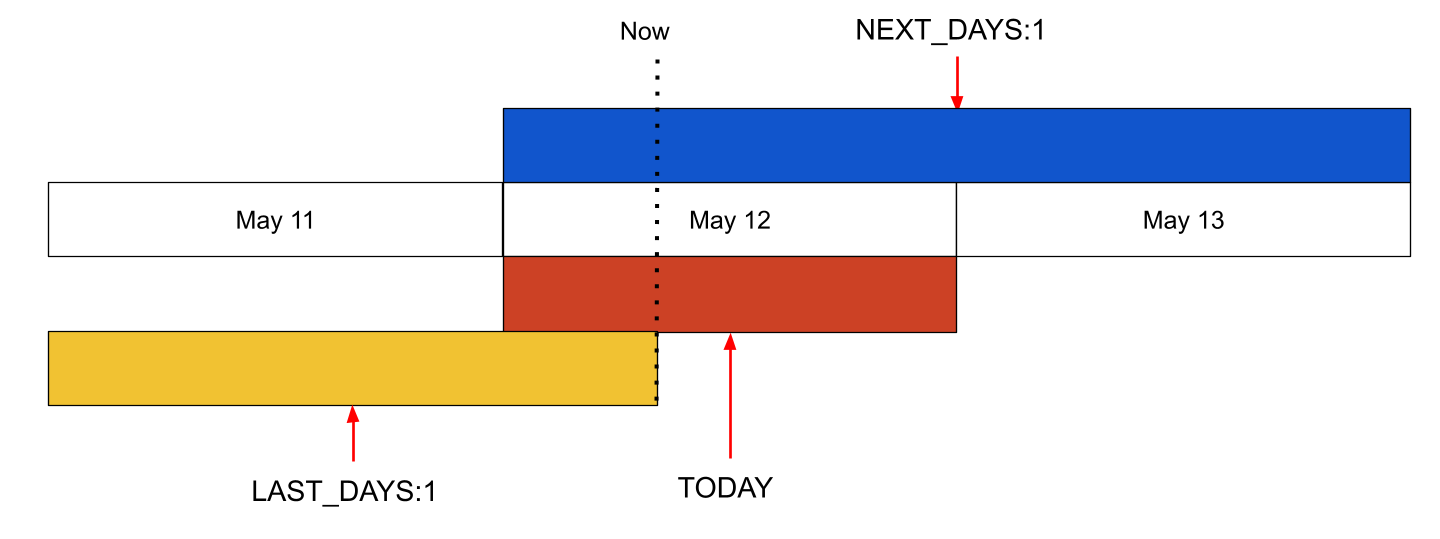
LAST_DAYS:n | Starts at SOD n days before today. Ends on the current second. | Includes part of today. Learn more about day literal ranges. |
NEXT_DAYS:n | Starts at SOD today. Ends at EOD n days after today. | Covers n+1 days, including today. Learn more about day literal ranges. |
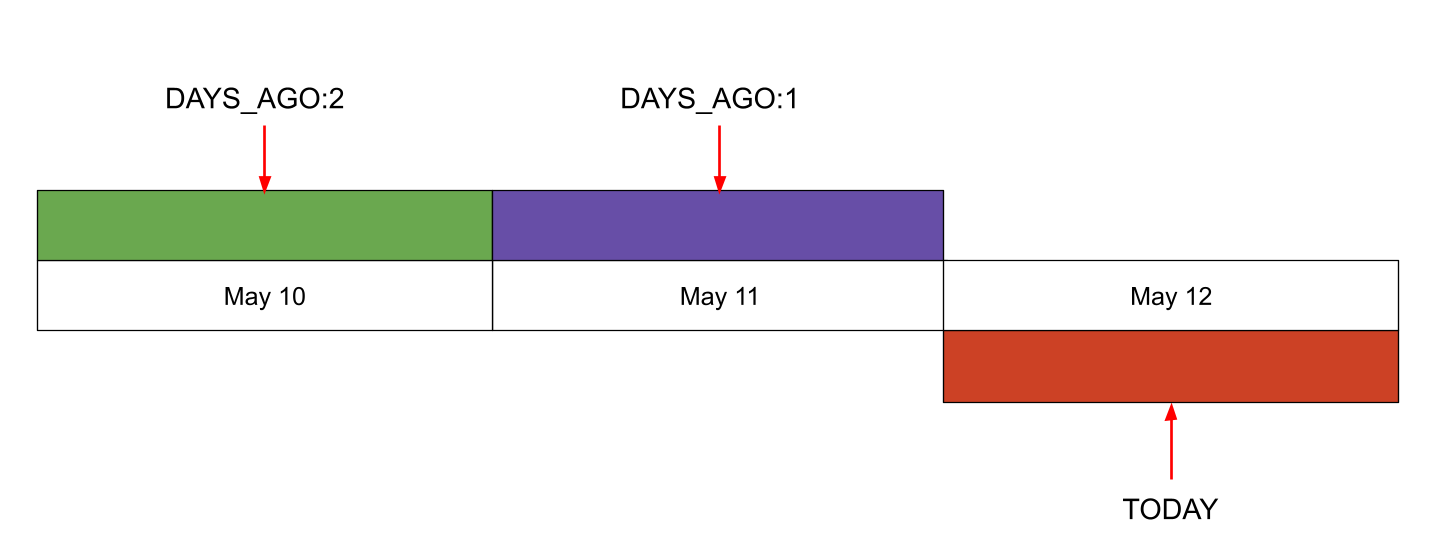
DAYS_AGO:n | Starts at SOD n days before today. Ends at EOD on that day. | Covers only 1 day and does not include today. Learn more about day literal ranges. |
THIS_MONTH:n | Starts at SOD on the first day of this month. Ends at EOD on the last day of this month. | |
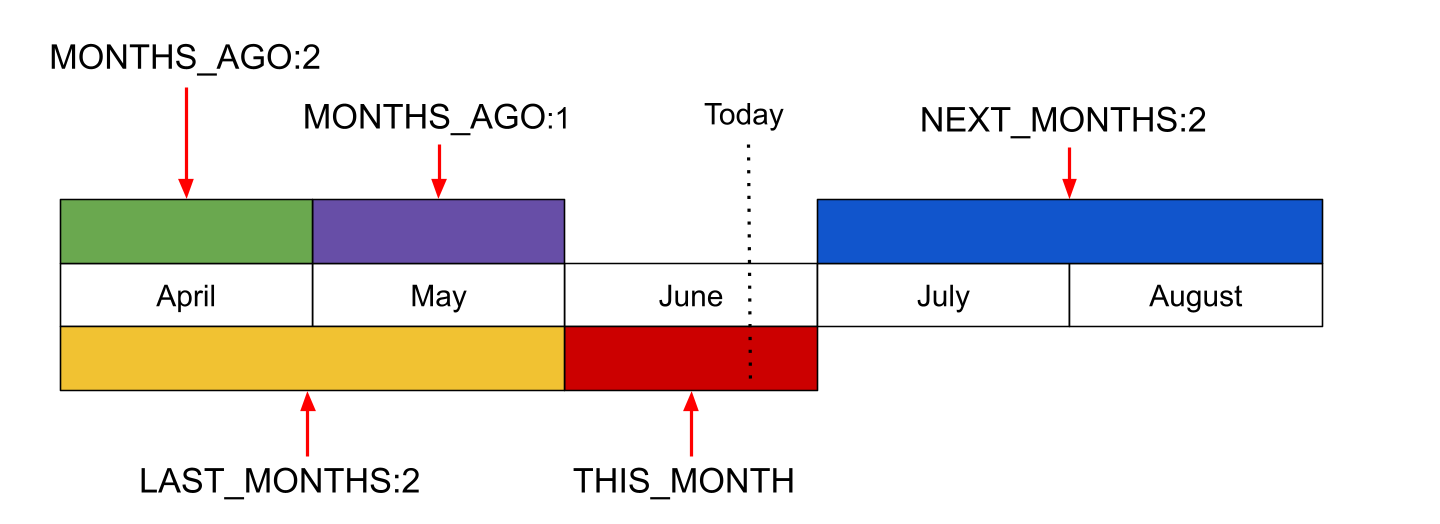
LAST_MONTHS:n | Starts at SOD on the first day of the month n months before this month. Ends at EOD on the last day of last month. | Does not include this month. Learn more about month literal ranges. |
NEXT_MONTHS:n | Starts at SOD on the first day of next month. Ends at EOD on the last day of the month n months after this month. | Does not include this month. Learn more about month literal ranges. |
MONTHS_AGO:n | Starts at SOD on the first day of the month n months before this month. Ends at EOD on the last day of that month. | Covers only 1 month and does not include this month. Learn more about month literal ranges. |
THIS_QUARTER:n | Starts at SOD on the first day of this quarter. Ends at EOD on the last day of this quarter. | |
LAST_QUARTERS:n | Starts at SOD on the first day of the quarter n quarters before this quarter. Ends at EOD on the last day of last quarter. | Does not include this quarter. Learn more about quarter literal ranges. |
NEXT_QUARTERS:n | Starts at SOD on the first day of next quarter. Ends at EOD on the last day of the quarter n quarters after this quarter. | Does not include this quarter. Learn more about quarter literal ranges. |
QUARTERS_AGO:n | Starts at SOD on the first day of the quarter n quarters before this quarter. Ends at EOD on the last day of that quarter. | Covers only 1 quarter and does not include this quarter. Learn more about quarter literal ranges. |
THIS_YEAR:n | Starts at SOD on the first day of this year. Ends at EOD on the last day of this year. | |
LAST_YEARS:n | Starts at SOD on the first day of the year n years before this year. Ends at EOD on the last day of last year. | Does not include this year. Learn more about year literal ranges. |
NEXT_YEARS:n | Starts at SOD on the first day of next year. Ends at EOD on the last day of the year n years after this year. | Does not include this year. Learn more about year literal ranges. |
YEARS_AGO:n | Starts at SOD on the first day of the year n years before this year. Ends at EOD on the last day of that year. | Covers only 1 year and does not include this year. Learn more about year literal ranges. |
Interpreting Day Ranges
Section link for Interpreting Day RangesSome of the DAYS date literals include part or all of today:
LAST_DAYS:nincludes the previous n days plus part of today (up to the current second). For example,LAST_DAYS:1includes all of yesterday and part of today.NEXT_DAYS:nincludes all of today plus all of the next n days. For example,NEXT_DAYS:1includes all of today and tomorrow.
DAYS_AGO:n does not include today. For example, DAYS_AGO:1 includes all of yesterday and no part of today.
Interpreting Month, Quarter, & Year Ranges
Section link for Interpreting Month, Quarter, & Year RangesIf the UNIT in {UNIT}_AGO:n, LAST_{UNIT}:n, and NEXT_{UNIT}:n is a unit other than DAYS, the period does not include today or any part of the current period. For example, if the query ran in June, LAST_MONTHS:2 ranges from the start of April to the end of May.
Operator Behavior
Section link for Operator BehaviorYou can only use symbolic comparison operators with date literals. Other operators are not supported.
Each operator uses the upper or lower limits of a date literal range for comparison with the specified field values. For example, the = operator retrieves values that fall within the lower and upper limits of the given date literal.
The following table shows the behavior of each comparison operator when used with a date literal on a DateTime field. Assume the example queries in this table ran on September 24, 2024.
| Operator | Range | Example Date Literal Query | Equivalent Query |
|---|---|---|---|
= | Field values between the lower and upper limits, inclusive | WHERE created_date__v = TODAY | WHERE created_date__v BETWEEN '2024-09-24T00:00:00.000Z' AND '2024-09-24T23:59:59.000Z' |
!= | Field values outside of the lower and upper limits | WHERE created_date__v != TODAY | WHERE created_date__v < '2024-09-24T00:00:00.000Z' OR created_date__v > '2024-09-24T23:59:59.000Z' |
> | Field values greater than the upper limit | WHERE created_date__v > TODAY | WHERE created_date__v > '2024-09-24T23:59:59.000Z' |
< | Field values less than the lower limit | WHERE created_date__v < TODAY | WHERE created_date__v < '2024-09-24T00:00:00.000Z' |
>= | Field values greater than or equal to the lower limit | WHERE created_date__v >= TODAY | WHERE created_date__v >= '2024-09-24T00:00:00.000Z' |
<= | Field values less than or equal to the upper limit | WHERE created_date__v <= TODAY | WHERE created_date__v <= '2024-09-24T23:59:59.000Z' |
For queries on Date fields, VQL performs the comparison using only the date. For example, WHERE launch_date__c = TODAY would resolve to WHERE launch_date__c BETWEEN '2024-09-24' AND '2024-09-24'.
Query Examples
Section link for Query ExamplesThe following are examples of queries using date literals.
Query: Retrieve Records Created Last Month
Section link for Query: Retrieve Records Created Last MonthThe following query returns the ID and name of all Product records that were created last month:
SELECT id, name__v
FROM product__v
WHERE created_date__v = LAST_MONTHS:1
Query: Exclude Today
Section link for Query: Exclude TodayThe following query returns the Product records with a Launch Date occurring within the next five (5) days, excluding today. Since NEXT_DAYS:5 includes today, you can exclude today’s results using > TODAY or != TODAY.
SELECT id, name__v, launch_date__c
FROM product__v
WHERE launch_date__c = NEXT_DAYS:5 AND launch_date__c != TODAY