
Integration Types
A Vault integration refers to linking Vault with an external system, so the systems function together to achieve a connected business process. Depending on the integration objective, this may be initiated from either system when a predefined event occurs, at which point data will flow to the other system and subsequent actions may occur.
The common integration types are:
- Integration with Direct Data API
- Integration with Enterprise Security
- Data Integration
- User Interface (UI) Integration
- Business Process
- Vault Initiated Notification
- External Integration
- Vault to Vault Connections
- Enterprise Data Warehouse
Integration with Direct Data API
Section link for Integration with Direct Data APIDirect Data API provides a reliable, easy-to-use, timely, and consistent API for extracting Vault data to an external database, data warehouse, or data lake. While Direct Data API is not designed for real-time application integration, organizations that wish to replicate large amounts of Vault data can leverage Direct Data API within their integrations.
To learn more, see our guide on Building Direct Data API Integrations. We also offer open-source accelerators as a starting point to build your custom integration.
Integration with Enterprise Security
Section link for Integration with Enterprise SecurityFor Vaults where enterprise security using single-sign on (SSO) is required SAML 2.0 should be configured so users can be authenticated against your chosen identity provider. Where SSO is required for all users it will be necessary to apply the same rules for any integration users. Hence the session details needed to make Vault API calls will need to be established by adhering to the SSO rules for the authentication provider.
For external applications connecting to Vault with SSO enabled, authentication will be done using OAuth 2.0 / OpenID connect, to generate a session id. Learn more about OAuth 2.0 / OpenID connect.
Data Integration
Section link for Data IntegrationData Integration is the process that creates a universal set of both transactional and reference data across applications within an organisation. For each piece of data, one system is responsible for maintaining it and copying it to other systems.
Extracting Vault Object Data from Vault
Section link for Extracting Vault Object Data from VaultThe pattern for integrating Vault Object data into an external application in scheduled batches is:
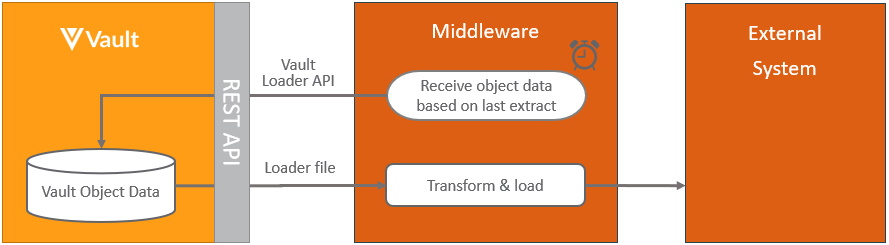
This process is based on pulling the data in scheduled batches from Vault, incremental refresh can be restricted to only include data that has changed since the last refresh by adding a where clause for each object, where the modified date is after the last incremental refresh, for example using the Vault Loader vql_criteria__v as modified_date__v >= ‘2021-09-09T12:00:00.000’. Note that deleted records will not be included with this approach.
This process can be extended further by triggering the pull of object data from within Vault, by using the Vault initiated notification.
Learn more about the Vault components used in this process at Vault Loader.
Extracting Documents from Vault
Section link for Extracting Documents from VaultThe pattern for integrating Vault documents and/or data into an external application in scheduled batches is:
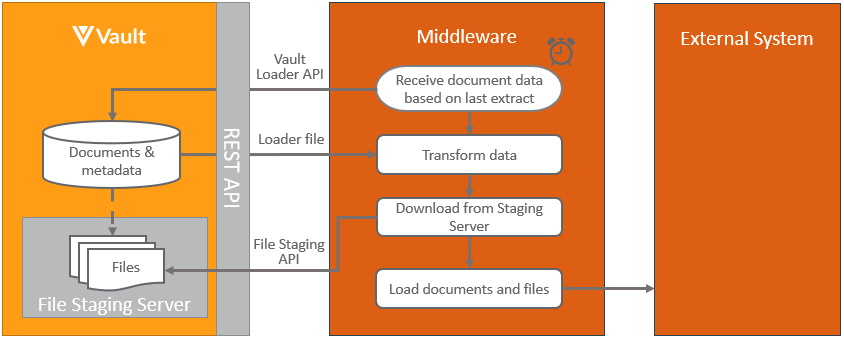
This pattern is based on pulling the documents in scheduled batches from Vault, incremental refresh can be restricted to only include document that have changed since the last refresh by adding a where clause for each document, where the modified date is after the last incremental refresh, for example vql_criteria__v is modified_date__v >= ‘2021-09-09T12:00:00.000’. Note that deleted documents will not be included with this approach.
This pattern can be extended further by triggering the pull of documents from within Vault, by using the Vault initiated notification.
Learn more about the Vault components used in this process at Vault Loader and Vault’s file staging.
Pushing Object Data into Vault
Section link for Pushing Object Data into VaultThe pattern for integrating data from an external application into Vault objects in scheduled batches is:
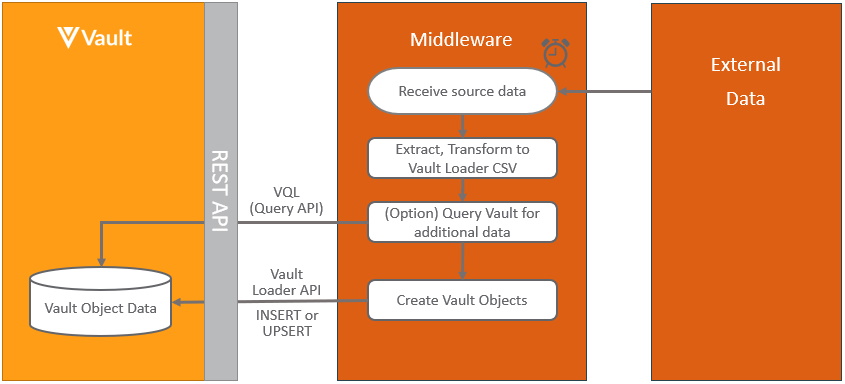
When loading data from an external system into Vault, it’s recommended to store the record identifier in either the Vault external_id__v field or any other unique field, to be able to easily link the records. Learn more about the Vault components used in this process at VQL and Vault Loader.
Pushing Documents into Vault
Section link for Pushing Documents into VaultThe pattern for integrating documents from an external application into Vault in scheduled batches is:
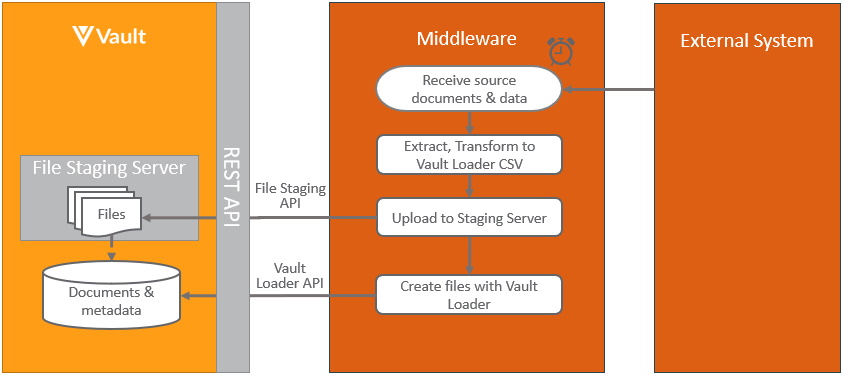
When loading documents from an external system into Vault, it’s recommended to store the external document’s identifier in the Vault external_id__v field or any other unique field, to be able to easily link the documents.
Learn more about the Vault components used in this process at Vault Loader and Vault’s file staging.
User Interface (UI) Integration
Section link for User Interface (UI) IntegrationSome integrations require content from one system to be embedded in another, or for control to pass to another system, in order to offer users a more seamless experience.
Custom Pages
Section link for Custom PagesCustom Pages enable developers to extend Vault Platform by adding custom UI to Vault. Developers can build completely custom user interfaces in Vault using JavaScript and their preferred frameworks or libraries. Developers can also leverage the power of the Vault Java SDK to retrieve and manage Vault data. Learn more about Custom Pages.
Embedded Content
Section link for Embedded ContentThe pattern for displaying content from external systems and websites into Vault involves using Web Actions, Web Tabs, or Web Sections, as shown below:
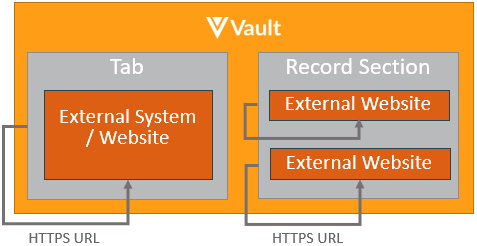
The merging of the content from Vault with the content from the external systems is done within the browser to provide a more seamless experience for the user.
Current Vault context can also be passed to the external systems to make the embedded content more meaningful to the user or record in context as it relates to object or document data. The Vault session can also be passed securely to enable additional API calls via Vault API. Learn more about securely sending the session.
Navigate to External Website
Section link for Navigate to External WebsiteThe pattern for passing control to another system from within the Vault UI in the context of document and object records involves using web action, as shown:
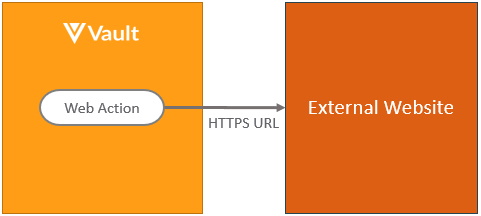
As with the embedded content pattern, context information can be passed in the link. Learn more about web actions.
Object fields can also be created containing hyperlinks to other websites using formula fields. Learn more about formula fields on objects
Business Process
Section link for Business ProcessMany integrations are process related, whereby when some event happens in one system, it needs to trigger a notification to a second system, so that some form of action can take place there. The second system may then in turn need to trigger a notification the first system and so on. Various patterns exist depending on which system initiates the process and whether the events are user initiated, automatic or scheduled from within Vault or controlled from within an external system.
Vault Initiated Notification
Section link for Vault Initiated NotificationVault initiated notifications can either be initiated using clicks vs code. The pattern for triggering notifications to be sent from Vault to an external system using custom code is shown below:
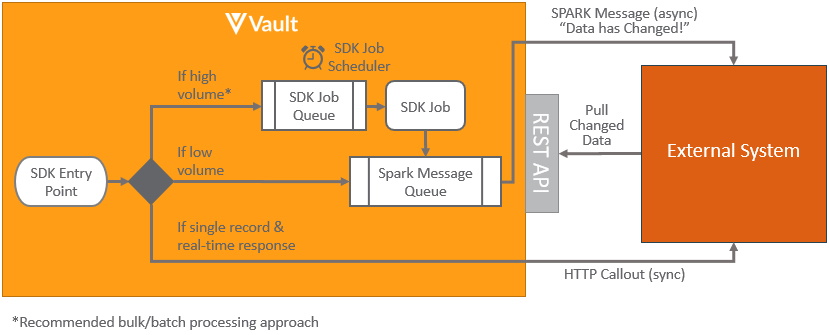
Vault Java SDK provides a number of different SDK Entry Points from which to initiate custom business logic to notify the external something has happened along with the context of the data. These SDK Entry Points include (but are not limited to):
- Document Actions: Executes whenever a user manually invokes a user action or when a document enters a certain lifecycle state. Learn more about document actions.
- Record Triggers: Executes whenever a record operation (
INSERT,UPDATE, orDELETE) occurs on an object record, via the UI or API. Learn more about record triggers. - Record Role Triggers: Executes whenever user roles are directly (manually) added or removed from an object record. Learn more about record role triggers.
- Record Actions: Executes whenever a user manually invokes a user action or a custom action on an object record is invoked. Learn more about record actions.
- Record Workflow Actions: Executes whenever a custom action on an object workflow is invoked. Learn more about record workflow actions.
- SDK Jobs: Executes periodically based on a job schedule. Learn more about job schedules
and job processors .
The mechanism for notifying the external systems depends on the use case:
- Asynchronous: High Transactional Volume: For raw objects or objects that change frequently, it is most efficient to process documents in batches. Hence when a SDK entry point is triggered an SDK Job can be queued to indicate the external system needs to notify data has changed. Rather than send it immediately, having a delay (for instance every 5 minutes) means that if any other SDK entry points are triggered, there is no need to schedule another SDK Job, since one is already queued. Then when the delay period is reached, the external system can be notified that data has changed. This notification will be sent using an asynchronous Spark message. Learn more about Spark messaging. These messages are intended to be lightweight notifications rather than containing large payloads of what data has changed. The external system can then use Vault API to pull details of what has changed since the last time the data was pulled, using a VQL query restricted by
last_modified_date__vor other VQL filters. - Asynchronous: Low Transactional Volume: For objects that change infrequently Spark messaging can be used to notify the external system, changes have been made when an SDK entry point is triggered. The recommended process is the same as with high transaction volume records, but without using the SDK Job to add a delay to batch records. Where the volume of records being sent is likely to increase in the future as the Vault usage grows, the raw object approach is recommended.
- Synchronous: Single Record & Real-time Response: In the case where there is a need to get an immediate synchronous response from the external system that the process has been completed, this can be achieved using an HTTP callout. Learn more about HTTP callout. The time taken to receive a call response from the external system is important to ensure the process doesn’t time out. Processing records one at a time is much more resource intensive, and therefore isn’t a good solution for frequently changing records, where the asynchronous transactional approach is more efficient. The synchronous approach is also far less resilient to failures and SDK timeouts occurring. The pattern for triggering notifications to be sent from Vault to an external system using no-code, involves using Web Actions, Web Tabs, or Web Sections from within the Vault in the same way as with UI Integrations. Web jobs also provide a no code option for calling external URLs from within a job.
External Integration
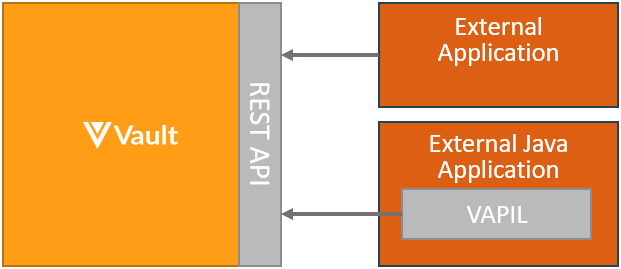
Section link for External IntegrationThe pattern for integrating from either an external system or middleware system to Vault, is to use Vault API. Hosted integrations built this way can both push and pull data to and from Vault. Both bulk and asynchronous processing are supported, for best performance. Java based applications should utilize the Vault API Library (VAPIL):
Vault to Vault Connections
Section link for Vault to Vault ConnectionsA Vault to Vault Connection relates to integrating data, documents and processes between Vault application families, either using productized connectors or custom integrations.
Standard Vault Connections
Section link for Standard Vault ConnectionsStandard productised connections are available between Vaults within the same domain to support specific business processes. These connections can be enabled through configuration without the need to develop custom solutions. Learn more about the latest standard Vault connections
Linking Documents
Section link for Linking DocumentsThe pattern for enabling content from one Vault to be used in another Vault is done using CrossLinks. These can either be created from within the Vault UI or created automatically using either a standard Vault Connection or using Vault Java SDK code. Learn more about CrossLink
Custom Vault Connections
Section link for Custom Vault ConnectionsCustom connections between Vault can be built using the same technology as standard connections without the need for middleware by using the pattern shown below:
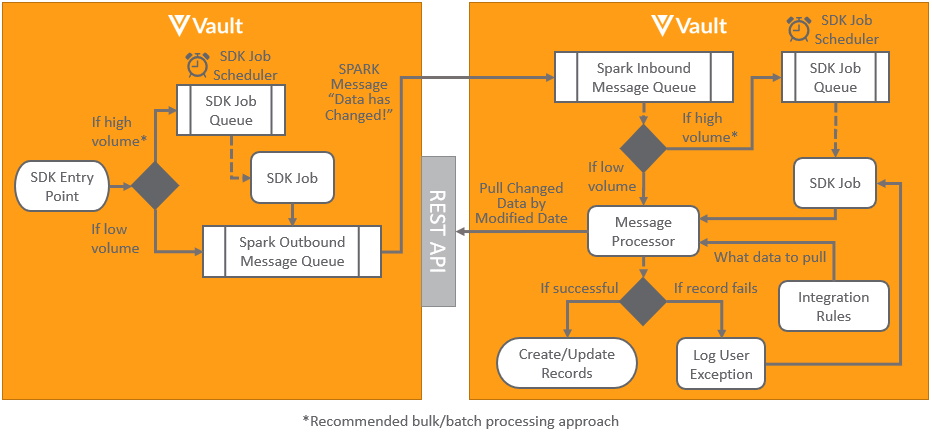
This pattern uses custom Vault Java SDK code Spark messages to asynchronously notify another Vault data has changed placing it in an inbound Spark message queue. This is then processed by a Spark message processor, which performs a callback to the source Vault to retrieve details of any data that has changed since the previous load. Vault Connections and integration rules can be utilized to configure what data to pull between the Vaults.
Where the data being transferred may contain multiple records it’s recommended to use SDK jobs both outbound and inbound to batch records for bulk processing, as it’s far more efficient than processing individual records. This is achieved by scheduling the jobs to run at scheduled intervals, for instance every five minutes after a change has occurred.
Should any errors occur when processing records, such as a record missing a mandatory field, user exceptions can be logged for the integration for reporting to users.
When transferring documents it’s good practice to use cross-links rather than copying the files to ensure a single version of the truth across applications. Learn more about linking documents.
Certified Middleware Connections
Section link for Certified Middleware ConnectionsCustom connections can also be built using a middleware solution, using the outbound and inbound processes for handling documents and data. Veeva also partners with multiple certified technology partners
Enterprise Data Warehouse
Section link for Enterprise Data WarehouseData lakes and data warehouses are commonly used by enterprise customers either as a central store for cross application data on which to perform analytics, or as an integration hub and single source of truth for multiple applications. Feeding data from Vault into data lakes and data warehouses for these purposes typically follows one of these patterns:
Migration
Section link for MigrationMigrations refer to loading large volumes of data or documents into Vault. Migrations typically occur as a one off project when migrating data from legacy systems or as an incremental migration. Learn more about Vault migrations.
Log Analysis and Security Information Event Management (SIEM)
Section link for Log Analysis and Security Information Event Management (SIEM)Log Analysis and Security Information Event Management systems are often used by enterprise customers to provide an analysis of system usage and event monitoring for security purposes. The types of Vault audit trail logs include documents, objects, system, domain and login.
Alternatively, log information can be programmatically retrieved from Vault using the Audit History API.