
Anatomy of a Record Trigger
You can implement record triggers as normal Java classes. You can express complex business logic within a trigger class.
The code sample below explains the anatomy of a typical, basic trigger class. This example simply defaults a field value based on another field when creating a new record.
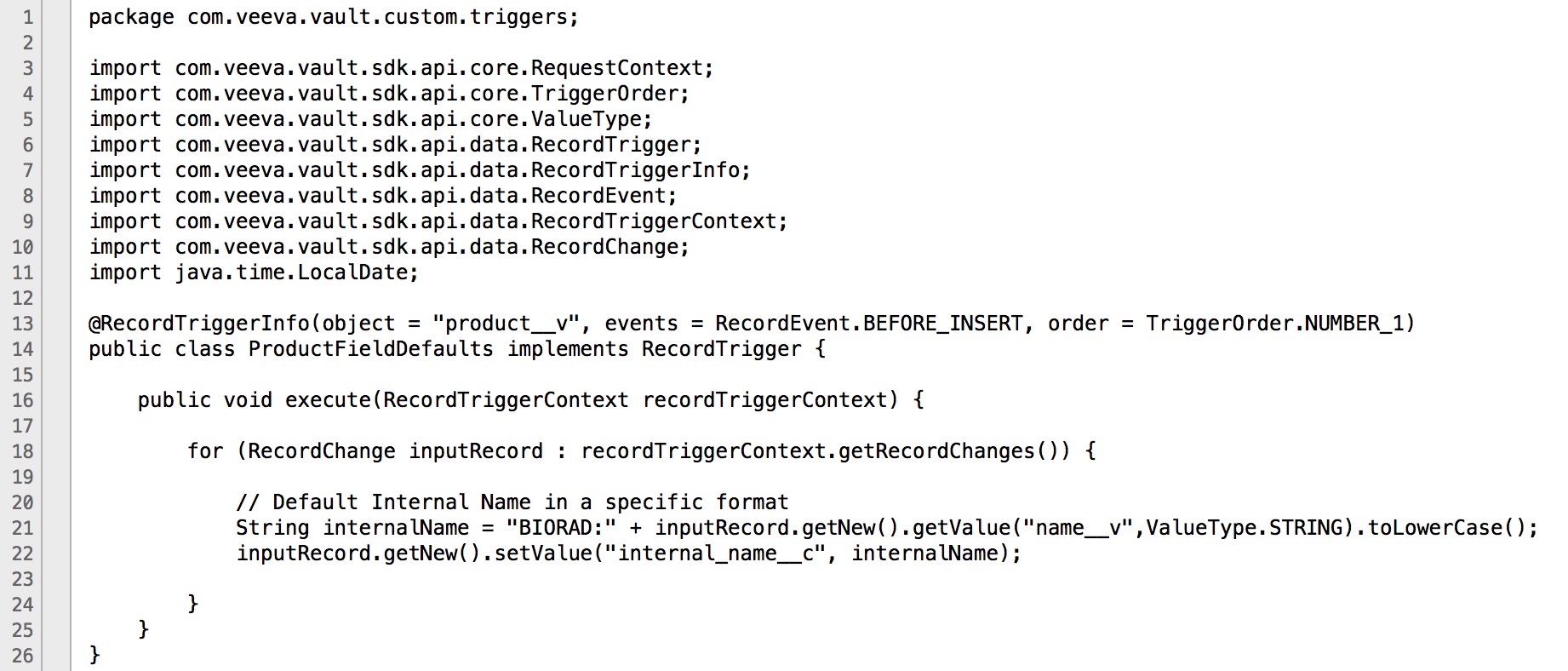
The explanations and line numbers below refer to the code sample above.
Line #1: Package
Section link for Line #1: PackageA custom record trigger must be under the com.veeva.vault.custom package. You can have further sub-package names as you see fit to organize your triggers. For example, you might use com.veeva.vault.custom.rim.submissions.triggers to indicate custom triggers for a RIM Submissions project.
Lines #3-11: Import
Section link for Lines #3-11: ImportOnly references to Vault Java SDK (com.veeva.vault.sdk.api.*) and a limited number of allowlisted classes, interfaces, and methods in the JDK are allowed. For example, String, LocalDate, List, etc.
Line #13: Annotation
Section link for Line #13: AnnotationThe class annotation (@RecordTriggerInfo) indicates that this class is a record trigger. The annotation specifies the Object, event(s), and Order of execution.
- "object": Must be a valid object name. For example,
product__v. This specifies the object that the trigger code will execute on. - "event": Can be a single event or multiple events, for example,
{RecordEvent.BEFORE_INSERT, RecordEvent.BEFORE_UPDATE}. This specifies the event(s) that the trigger code will execute on. - "order": [Optional] the order a trigger will execute relative to other triggers on the same object and event. Lower orders execute first.
Line #14: Class Name
Section link for Line #14: Class NameThe class name declaration must include the public modifier and implements RecordTrigger. As a best practice, class name should indicate the object affected by this trigger and some functional description, for example, ProductFieldDefaults implements RecordTrigger means a trigger on Product that defaults some field values.
Line #16: execute() Method
Section link for Line #16: execute() MethodYou must implement this method for the RecordTrigger interface. This method has an instance of RecordTriggerContext passed in, so you can interact with the record(s) on which a user has initiated some operation.
Line #18: Context Record(s)
Section link for Line #18: Context Record(s)When a user performs a record operation whether by UI or API, such as creating a new record, the record being created is the context record. The operation may have multiple context records such as in a Bulk Create.
A list of records affected by the operation can be retrieved from RecordTriggerContext#getRecordChanges, and you can loop through each record to get field values and/or set field values. Your business logic is enclosed in this loop.
Line #21: getValue(String fieldName, ValueType.<T> fieldType)
Section link for Line #21: getValue(String fieldName, ValueType.<T> fieldType)You can retrieve field values from the context record. Trigger code operates as the System user, so no record level or field level security apply. All records and fields are accessible.
For new records, only new values are available. For updating records, both old and new values are available. The fieldName argument must be a valid field name in the object. For example, name__v. The fieldType argument must match the Vault field type in order to return the appropriate Java data type. Use the Data Type Map to find out how data types are mapped to objects in Vault.
Line #22: setValue(String fieldName, Object fieldValue)
Section link for Line #22: setValue(String fieldName, Object fieldValue)You can set field value on fields that are editable. System fields, such as created_by__v and state__v, and Lookup fields are not editable.
The fieldName argument must be a valid field name in the object. The fieldValue argument must be an object of the appropriate data type for the field in the fieldName argument. Use the Data Type Map to find out how data types are mapped to objects in Vault.
User Triggers
Section link for User TriggersThe Vaut Java SDK supports record triggers on the user__sys object. Users triggers work the same way as other record triggers, with some exceptions.
Most record triggers execute whenever a data operation makes changes to an object record. Unlike most record triggers, user triggers execute only when changes are made directly to the user__sys object record in a Vault. In other words, user triggers are not invoked by indirect updates.
For example, triggers on the user__sys object are not invoked in the following scenarios:
- Synchronizing user attributes across multiple domains, for example, updates to domain user attributes like first name, last name, or email address only invoke user triggers in the Vault where the change originated. This also applies to cross-domain users.
- Updating the domain user Status attribute to Inactive
- Creating or updating System-owned users