Skip to content

Authenticating to your Vault

Your Vault user account must have API access to send requests to the Vault API. Then, you can authenticate your Vault and make calls to endpoints. The Vault API Reference and Vault Platform Postman Collection endpoints share the same folder hierarchy.

An active session ID is required to make calls to Vault API. To generate a valid session ID, you must use one of the authentication endpoints and provide your Vault credentials. For example, to authenticate your account and obtain a session ID using your Vault user name and password, navigate to Authentication > User Name and Password and send a request to this endpoint.

AuthenticationAuthentication

The authentication endpoints authenticate your user to the Vault specified in {{vaultDNS}}, a variable configured when creating your environment. For example, https://{vaultDNS}/api/{version}/auth. This will generate a session for the subdomain specified. To quickly view the current value for a variable in your Postman environment, you can click on or hover over the variable name in the request URL.

Authentication responseAuthentication response

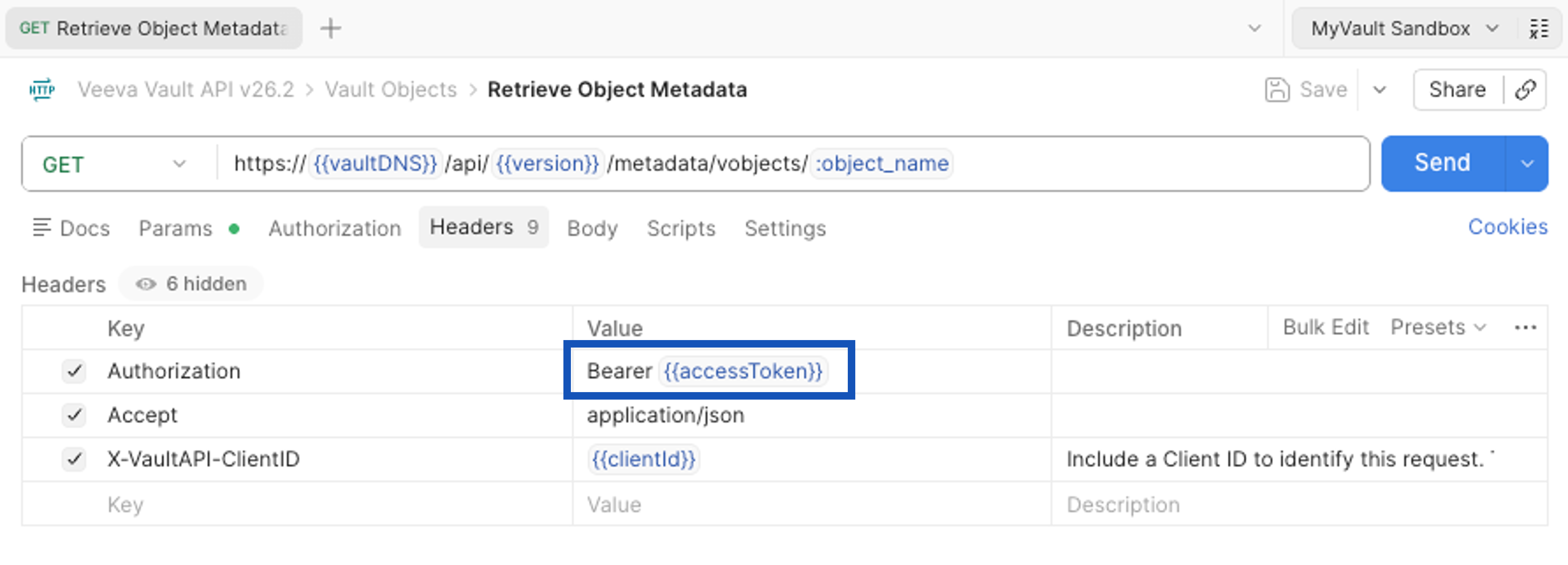
On SUCCESS, this request returns a valid sessionId for any Vault DNS where the user has access. This sessionId serves as the user’s “login credentials”, and must be included in the Authorization header of all other Vault API calls. If you’ve set up your Vault Postman Environment, Postman will automatically include this sessionId inside the Authorization HTTP request header to be used for every subsequent API call.

A session remains active as long as any activity occurs within the session duration period. This duration varies by Vault and is configured by a Vault Admin. When using Vault API, a user is considered idle after their last request finishes executing. To keep a session active, use the Session Keep Alive endpoint.

If you’ve set up your Vault Postman Environment, authenticating with Postman will automatically save the value returned for the sessionId to your active environment, making it convenient to send further API calls.

If the specified Vault is invalid or inactive, authentication defaulting may return a session ID for the user’s most relevant available Vault. You can verify that the currently authenticated Vault shown by the vaultId in the response is the expected one. Learn more about session management and best practices.