
About Annotations
Within the Vault UI document viewer, users can mark up and comment on documents with a wide variety of annotations. For example, users can choose to create note, line, link, or anchor annotations, and can reply to other annotations. Learn more about document annotations in Vault Help
Developers can use Vault API and Vault Java SDK to retrieve annotation type metadata, read field values for individual annotations, edit or delete existing annotations, and create new annotations. Users of either tool should reference the following information when working with annotations.
The following article explains document annotations and their properties in Vault. To learn how to create annotations with Vault API, see our user guide.
Annotation Types
Section link for Annotation TypesThere are multiple annotation types that vary in appearance, location, and function.
The following annotation types exist in all Vaults:
- Note (
note__sys): Corresponds to the Comment option in the UI. Users can select an area on a document to place an annotation or sticky annotation, which adds a fixed-size icon to a document. - Line (
line__sys): Users can draw lines on a document and add comments about those lines. - Link: Users can link to another document, an anchor within another document, or an anchor within the same document. Users can choose to create either document links or permalinks:
- Document Link (
document_link__sys): Creates a standard document link. - Permalink (
permalink_link__sys): Creates a link to a permalink, which persists throughout document versions. Vault checks and updates the link each time the Doc Info page loads so that it always directs users to the latest version of the document.
- Document Link (
- Anchor (
anchor__sys): Users can add anchor annotations to text or area selections within a document. - Reply (
reply__sys): Replies are a special type of annotation created when a user replies to another annotation. Reply annotations include a parent annotation (reply_parent__sys) and a position index (reply_position_index__sys), which is automatically assigned by Vault upon creation of the reply. - External Link (
external_link__sys): Created when a user adds a link to a URL outside of Vault in the text of an annotation.
PromoMats
Section link for PromoMatsPromoMats Vaults include additional annotation types related to Text and Claims Management functionality. Some of these types cannot be created directly by users, but are instead created by Vault in response to the Suggest Links user action. Learn more about using text and claims management in Vault Help
The following annotation types exist in PromoMats Vaults:
- Suggested Link (
suggested_link__sys): When a document enters a given lifecycle state, or when a user performs the Suggest Links action, Vault generates suggested links for non-exact text matches, which users must then accept or reject. - Approved Link (
approved_link__sys): Created by Vault when a user accepts a suggested link. - Auto-Accepted Link (
auto_link__sys): Created automatically by Vault when a user bypasses the approval step. - Claim Link (
keyword_link__sys): Created by a user manually selecting a Text Asset (annotation_keywords__sys) or Claim based on matching fields.
Annotation Fields
Section link for Annotation FieldsThe fields configured for each annotation type may vary.
Each annotation may contain the following fields:
| Field Name | Description |
|---|---|
ID (id__sys) | The annotation ID. |
Document Version ID (document_version_id__sys) | The ID and version number of the document where the annotation appears, in the format {documentId}_{majorVersion}_{minorVersion} (e.g., 138_2_1). |
Anchor Name (anchor_name__sys) | Anchor annotations only. The name of the anchor. Allows up to 140 characters. |
Color (color__sys) | The name of the annotation color. Some types allow users to select from a variety of colors, while others are always the same color. |
Comment (comment__sys) | The annotation comment text. Allows up to 32,000 characters. Not all annotation types allow comments. |
Created by Delegate User (created_by_delegate_user__sys) | The ID of the delegate user who created the annotation, if applicable. |
Created by User (created_by_user__sys) | The ID of the user who created the annotation. |
Created Date Time (created_date_time__sys) | The date and time when the annotation was created. |
Modified by User (modified_by_user__sys) | The ID of the user who last modified the annotation. Defaults to the Created By User value if no last modified information exists. |
Modified Date Time (modified_date_time__sys) | The date and time when the annotation was last modified. Defaults to the Created Date Time value if no last modified information exists. |
Persistent ID (persistent_id__sys) | The persistent ID. This ID remains the same across all document versions when brought forward. Older annotations may not have one until updated or brought forward. |
External ID (external_id__sys) | The external ID. Optional non-empty string with a maximum of 250 characters. |
Linked Object (linked_object__sys) | The name of the primary linked object for the annotation. Not all annotation types support linked objects. |
Linked Records (linked_records__sys) | The ID(s) of the object record or records the annotation is linked to. Not all annotation types support linked records. |
Match Text Variation (match_text_variation__sys) | PromoMats Vaults with Suggested Links enabled only. The ID of the matched_text_variation__sys object record linked to the annotation_keywords__sys record associated with the annotation. |
Reply Count (reply_count__sys) | For annotation types that support replies, the number of replies to this annotation. |
State (state__sys) | The name of the state of the annotation, either open__sys or resolved__sys. Not all annotation types support states. |
Tag Names (tag_names__sys) | A list of the names of each tag associated with each annotation. Not all |
Annotation Placemarks
Section link for Annotation PlacemarksA placemark defines where on a document or video an annotation appears. For example, a text selection, a page number, or the coordinates of an area selection. All annotation types require a placemark.
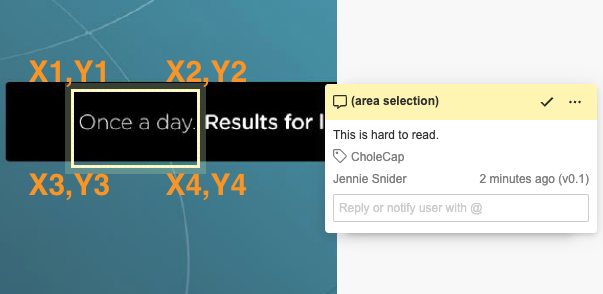
There are several types of placemarks for documents, some of which are only available for certain annotation types:
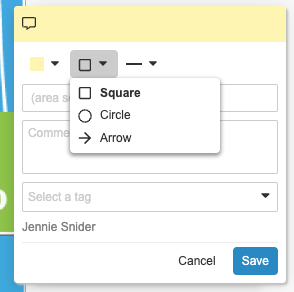
- Area Selection: Specifies the area on a document to place any of the following:
- Arrow (
arrow__sys): Users can place an arrow on a selected location in a document, adjust its size and color, and point it in any direction. - Ellipse (
ellipse__sys): Corresponds to the Circle option in the UI. Users can place a dotted line around an elliptical or round selection and adjust its size and line style. - Rectangle (
rectangle__sys): Corresponds to the Square option in the UI. Users can place a line around a square or rectangular selection and adjust its size and line style.
- Arrow (
- Line (
line__sys): Specifies the location of a line drawing on a document. Custom SDK code cannot create placemarks for line annotations. Custom SDK code and Vault API cannot create line annotations, however, they can update fields on existing line annotations. - Page Level (
page_level__sys): Specifies a document page number with no other detail about the placement of the annotation. - Reply (
reply__sys): Specifies a reply’s reference to its parent as well as where among the parent’s replies this reply is located. - Sticky (
sticky__sys): Specifies the placement of the sticky note icon. - Text (
text__sys): Specifies the text selection for the annotation.
Video Annotation Placemarks
Section link for Video Annotation PlacemarksThe following placemark types are exclusive to annotations on videos:
- Video Arrow (
video_arrow__sys): Users can place an arrow placemark on a video document. - Video Ellipse (
video_ellipse__sys) - Corresponds to the Circle option in the UI. Users can place an ellipse placemark a video document. - Video Rectangle (
video_rectangle__sys) - Corresponds to the Square option in the UI. Users can place a rectangle placemark on a video document.
Annotation Placemark Fields
Section link for Annotation Placemark FieldsAnnotation placemark fields dictate the appearance, size, and location of a placemark. Placemark coordinates on non-video documents are listed in the style of PDF quad points and are measured in pixels from the bottom-left of the page at 72 DPI. There will be 8*n coordinates, where n is the number of rectangles that make up the placemark.
Annotation placemarks on documents may include the following fields:
| Field Name | Description |
|---|---|
Coordinates (coordinates__sys) | A list of all coordinates for the placemark. Text placemarks must set the title__sys field to the selected text in addition to specifying coordinates. |
Height (height__sys) | The height of the selection, measured in pixels at 72 DPI. |
Page Number (page_number__sys) | The document page number where the annotation appears. Page numbers start at 1. |
Reply Parent (reply_parent__sys) | Reply-type annotations only. The ID of the parent annotation. |
Reply Position Index (reply_position_index__sys) | The position of a reply in a series of replies to a parent annotation. Positions start at 1. |
Style (style__sys) | The style of the placemark (e.g., sticky_icon__sys). |
Text End Index (text_end_index__sys) | Annotations placed on text selections only. The index of the last selected word on a page. |
Text Start Index (text_start_index__sys) | Annotations placed on text selections only. The index of the first selected word on a page. |
Width (width__sys) | The width of the selection, measured in pixels at 72 DPI. |
X Coordinate (x_coordinate__sys) | The X coordinate of the position of the top-left of the selection, measured in pixels at 72 DPI. |
Y Coordinate (y_coordinate__sys) | The Y coordinate of the position of the top-left of the selection, measured in pixels at 72 DPI. |
Video Annotation Placemark Fields
Section link for Video Annotation Placemark FieldsAnnotation placemarks on videos may include the following fields:
| Field Name | Description |
|---|---|
Video Height (video_height__sys) | The height of the selection on a video. Measured in pixels from the top-left of the video player at 940 x 573 resolution, inclusive of the letterbox or pillarbox. |
Video Width (video_width__sys) | The width of the selection on a video. Measured in pixels from the top-left of the video player at 940 x 573 resolution, inclusive of the letterbox or pillarbox. |
Video Time Signature (video_time_signature__sys) | The time signature of a video annotation in seconds (MM:SS or HH:MM:SS format, depending on the video's duration). May be null if the annotation is unplaced. |
Video X Coordinate (video_x_coordinate__sys) | The X coordinate of the position of the top-left of the selection on a video. Measured in pixels from top-left of the video player at 940 x 573 resolution, inclusive of the letterbox or pillarbox. |
Video Y Coordinate (video_y_coordinate__sys) | The Y coordinate of the position of the top-left of the selection on a video. Measured in pixels from the top-left of the video player at 940 x 573 resolution, inclusive of the letterbox or pillarbox. |
Considerations when Creating Placemarks
Section link for Considerations when Creating PlacemarksConsider the following when creating certain placemark types using Vault Java SDK or Vault API:
- Use Retrieve Annotation Placemark Type Metadata to retrieve metadata for a specified annotation placemark type. When setting placemark properties, exclude any that are system-managed (
system_managed=true). - Depending on the placemark type, some fields may be read-only. For example, you cannot set the
coordinates__sysfield for a rectangle (rectangle__sys) placemark. Instead, providex_coordinate__sysandy_coordinate__sysfields. - If allowed for the specified placemark type, use
coordinates__syswhen possible. - You cannot set the
text_start_index__sysandtext_end_index__sysif you’ve provided a value for thecoordinates__sysfield. - For annotations with text (
text__sys) placemarks andcoordinates__syspopulated,title__sysmust be set to selected text within the document. - The following placemark types require the
x_coordinate__sysandy_coordinate__sysfields:arrow__sysellipse__syssticky__sysrectangle__sys
Annotation References
Section link for Annotation ReferencesA reference is a way for an annotation to refer to an external entity. This can be a document, an anchor annotation on a document, an external URL, or a permalink. Not all annotation types allow references.
There are three types of annotation references:
- Document (
document__sys): Refers to a document or anchor. - External (
external__sys): Refers to an external URL. - Permalink (
permalink__sys): Refers to apermalink__sysrecord.
Annotation Reference Fields
Section link for Annotation Reference FieldsAnnotation references include the following fields:
| Field Name | Description |
|---|---|
Annotation (annotation__sys) | Document-type references only. The ID of the referenced anchor annotation, or null for references to an entire document. |
Document Version ID (document_version_id__sys) | Document-type references only. The ID and version number of the referenced document in the format {documentId}_{majorVersion}_{minorVersion}. For example, 138_2_1. |
Permalink (permalink__sys) | Permalink-type references only. The ID of the referenced permalink. |
URL (url__sys) | External-type references only. The URL of the external reference. Allows up to 32,000 characters. |