
Trigger Execution & Performance
Execute as System
Section link for Execute as SystemCustom code in Vault executes as the Java SDK Service Account, which has Vault Owner-level access. Vault extension code, such as triggers and actions, can access object records with full read/write permission. This means any Vault user level, record level, or field level access restrictions do not apply. Custom code can copy or move data from object to object and delete data without regards to who the user is. It's the developer's responsibility to take that current user context into consideration and apply control where appropriate.
Data security should be considered when designing solutions using the Vault Java SDK.
Because the Java SDK Service Account has Vault Owner-level access, SDK code cannot directly edit fields that a Vault Owner could not edit.
For example, the following component fields on documents cannot be directly edited by a Vault Owner or with Vault Java SDK:
major_version__vandminor_version__v: Instead of editing these fields directly, these fields only change during a document versioning event.status__v: Instead of editing this field directly, you must move the document through its document lifecycle. Vault Java SDK does not support Document Migration Mode. type__v,subtype__v,classification__v,lifecycle__v: Instead of editing these fields directly, you must reclassify the document.
Data Availability
Section link for Data AvailabilityWhen processing a request, the System performs the following sequence of steps:
- Evaluative field dependencies: Field dependencies
are UI-only and are validated before triggers are fired. If Vault Java SDK then changes data, field dependencies are not re-evaluated. - Execute
BEFOREAction Triggers. - Execute
BEFOREtriggers. - Write record changes to database.
- Update changes in VQL index.
- Execute
AFTERAction Triggers. - Execute
AFTERtriggers.
The data available in BEFORE and AFTER event triggers depends on the operations (INSERT, UPDATE, and DELETE). For example, in an INSERT operation, you cannot get old or existing values because a new record is being inserted. Similarly, setting a field value only makes sense in the BEFORE event in INSERT and UPDATE operations. It doesn't make sense to set field value after it has been persisted or in a DELETE operation. The following chart illustrates when you can get or set field values.
| getNew() | getOld() | |||
|---|---|---|---|---|
| getValue | setValue | getValue | setValue | |
| BEFORE_INSERT | ✓ | ✓ | ||
| AFTER_INSERT | ✓ | |||
| BEFORE_UPDATE | ✓ | ✓ | ✓ | |
| AFTER_UPDATE | ✓ | ✓ | ||
| BEFORE_DELETE | ✓ | |||
| AFTER_DELETE | ✓ | |||
Query vs RecordService#readRecord
Section link for Query vs RecordService#readRecordAs illustrated above, BEFORE triggers can change field values, but these values are not persisted to the database and not updated in the VQL index yet. In this case, using the QueryService to retrieve a record being modified by a trigger will only return the old (existing) values. In order to get the values set by a trigger inside a transaction, you must use the RecordService#readRecord method. However, this method generally uses more memory. It is only recommended when you need to get field values modified by multiple triggers in a single transaction. Otherwise, we recommend QueryService to retrieve record data.
Because AFTER triggers happen after database updates and VQL indexing, you can use QueryService to retrieve both old and new values.
System Populated Fields
Section link for System Populated FieldsCertain field types in Vault have values set by the System. For example:
- Lookup Fields
are read-only fields that the System populates with the "Lookup Source Field" value. - Document Reference Fields
have two fields (bound and unbound), and when configured to reference the "Latest Version", the bound field becomes read-only, and the System populates it with the latest document version value.
In general, the System populates field values after the BEFORE event. Because these field values are set by the System, the changes are not reflected in the BEFORE event. For example, getNew() and getOld() will return the same existing value or null accordingly. However, the AFTER event will return the new value set by the System in getNew() and the existing value in getOld(). For example, when creating a new document, documents using document auto-naming will have a null value for name in BEFORE_INSERT events.
In addition, because System-initiated requests do not fire triggers, triggers will not fire when the System updates a System-populated field.
If your trigger updates a document reference field, you must set the Document Version Reference to Specific Version. Learn more in Vault Help
Trigger Execution Flow
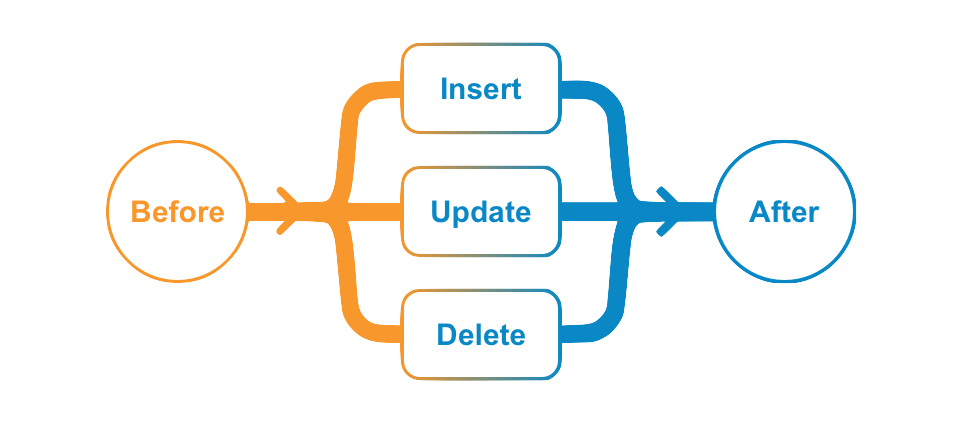
Section link for Trigger Execution FlowWhen a user initiates a request (INSERT, UPDATE, or DELETE) such as clicking Save in UI or sending a POST with Vault API, the system processes the request by firing the BEFORE event triggers first, then committing data to the database, and then firing the AFTER event triggers.
BEFORE triggers are often used for defaulting field values and validating data entry, whereas AFTER event triggers are mostly used to automate creating other records or starting workflow processes.
Trigger Order and Nested Depth
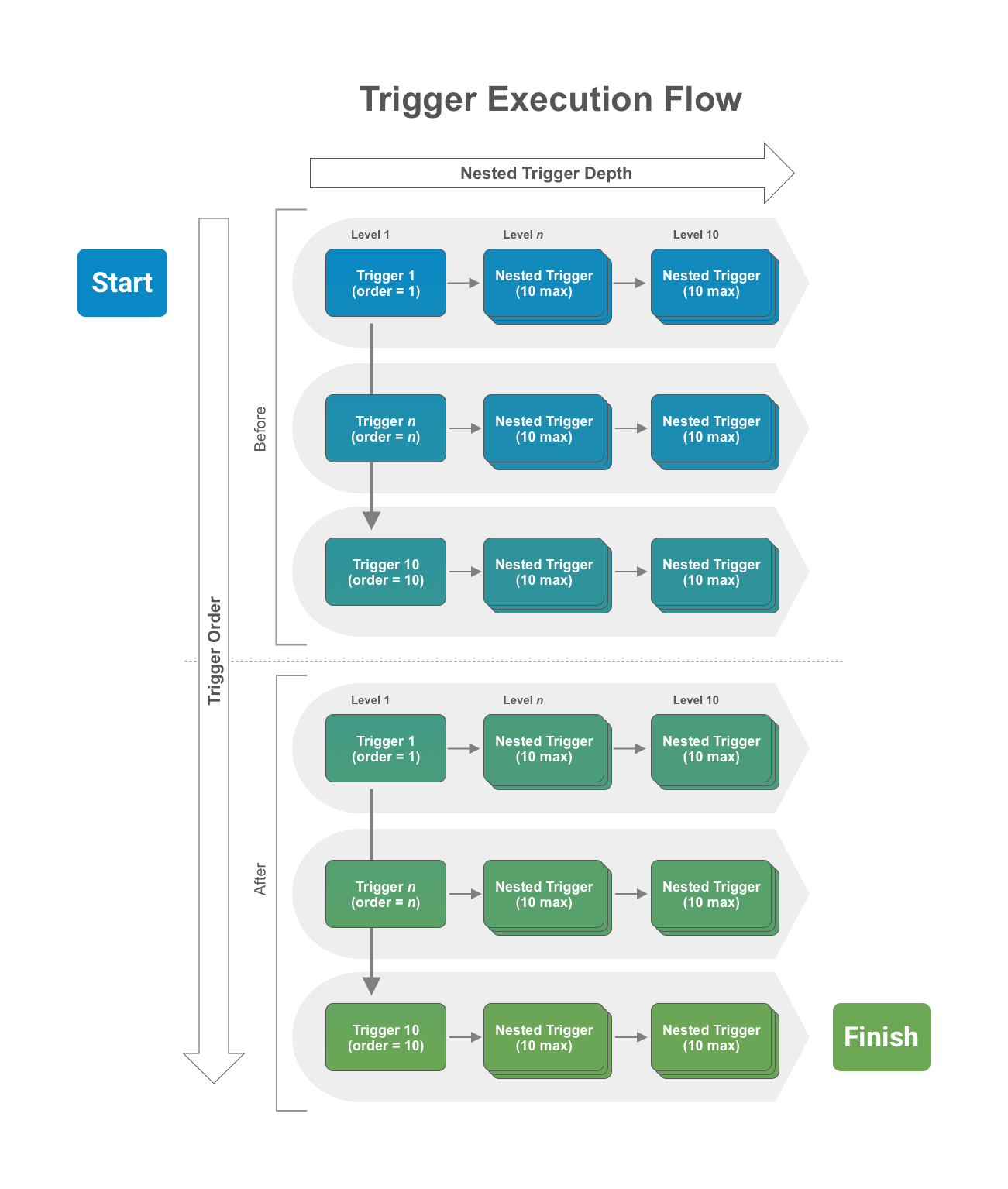
Section link for Trigger Order and Nested DepthA limit of 10 triggers are allowed in each event and the order of execution can be specified. That means BEFORE and AFTER events each have their own limit of 10 triggers allowed. In addition, when any given trigger executes, it can cause other triggers (nested triggers) to fire when it either performs a role a assignment or a data operation (INSERT, UPDATE, DELETE) programmatically. The nested trigger depth cannot exceed 10 levels deep.
To summarize, when a user initiates a request (for example, INSERT), the BEFORE event triggers (up to 10) will execute in order. If any of the triggers cause other triggers to fire, the nested triggers will execute (up to 10 nested levels). After the system finishes the BEFORE triggers, the data with any changes made by the executed triggers persists, and the AFTER event triggers will fire in the same manner with trigger order and nested depth. The image below illustrates this execution flow.
If you need to share data between different triggers or actions in the same transaction, you can do so with RequestContext.
System-Initiated Requests
Section link for System-Initiated RequestsGenerally, triggers fire when a user initiates a request. When the System updates records, such as Lookup Field updates, triggers do not fire.
When working with record triggers, when the System performs a Hierarchical Copy (deep copy), the insert operation will not fire any triggers.
Similarly, when working with doctype triggers, when the System deletes all document versions as a result of deleting a single document, the delete operation fires one document-level delete event and does not fire additional triggers for each deleted document version.
Terminating Execution
Section link for Terminating ExecutionThe trigger execution flow described above represents a transaction. In some cases, it is necessary to cancel the entire INSERT request and rollback any changes. Developers can throw a RollbackException in any trigger in the transaction, and execution will terminate immediately and roll back all changes.
Note that calling RecordChange#setError or RecordRoleChange#setError will not terminate a transaction. Instead, the trigger which caused the error will fail and the rest of the transaction will continue. In order to terminate an entire transaction, you should always throw a RollbackException.
The system will also terminate execution and rollback a request when errors occur, such as missing required field value on INSERT or exceeding allowed elapsed time limit (100 seconds).
Asynchronous Services
Section link for Asynchronous ServicesCalls to asynchronous services such as JobService or NotificationService will execute only when the request transaction completes. This way, you can use a RollbackException to stop the transaction if necessary, preventing asynchronous services from executing unintentionally when rolling back a transaction. For example, if a DELETE event trigger calls NotificationService to send a notification, but a nested trigger later rolls back the transaction, the system should not delete the record nor send the notification. This prevents the asynchronous notification process from executing erroneously. Once the entire transaction completes successfully, all queued asynchronous services execute immediately.
Performance Considerations
Section link for Performance ConsiderationsTriggers should be designed to process records in bulk, especially when making service calls, such as QueryService, RecordService and RecordRoleService. These services are designed to take a list of records or record role changes as input for CRUD operations. It is much more efficient to build a list of record for input and make a single call to these services rather than make service calls one record at a time inside a loop.
Triggers that do not process records in bulk will perform poorly, especially when there are multiple triggers (including nested triggers), execution will likely exceed the maximum elapsed time (100s) or CPU time (10s) allowed. In addition, queries that return large number of records with large number of fields (including fields not used in your code) will likely exceed the maximum memory allowed (40MB).
Generally, you should never run a query or perform CRUD operations on records in a loop. Each iteration will make unnecessary service calls which can be easily batched to get the same result with a single service call.
Performance Example
Section link for Performance ExampleThe following poorly performing code executes a query inside a "for" loop, for each Product record in a request. That means when a request has multiple records, like from an API call or bulk update wizard, the QueryService#query call is made for each of the records. The only difference between each query is the WHERE clause contains a different Country reference field value. Performing multiple queries in this case is inefficient and time consuming. A better approach is to make a single query with a CONTAINS clause for each Country referenced by the Product records in the request.
To make performance even worse, as each query is executed to retrieve related records, a forEach loop is used to call RecordService.batchSaveRecords to save each new Country Brand record one at a time. Creating, updating, and deleting records are the most expensive and time-consuming operations. You should always batch records up in a list as input when calling batchSaveRecords.
While the better performing code requires more lines of code as illustrated below, it performs much better because it reduces data operations significantly by leveraging the Vault Java SDK's interfaces to process records in bulk.
Poorly Performing Code:
Section link for Poorly Performing Code:@RecordTriggerInfo(object = "product__v", events = RecordEvent.AFTER_INSERT)
public class ProductCreateRelatedCountryBrand implements RecordTrigger {
public void execute(RecordTriggerContext recordTriggerContext) {
for (RecordChange inputRecord : recordTriggerContext.getRecordChanges()) {
QueryService queryService = ServiceLocator.locate(QueryService.class);
String queryCountry = "select id, name__v from country__v where region__c=" + "'" + region + "'";
QueryResponse queryResponse = queryService.query(queryCountry);
queryResponse.streamResults().forEach(queryResult -> {
Record r = recordService.newRecord("country_brand__c");
r.setValue("name__v", internalName + " (" + queryResult.getValue("name__v", ValueType.STRING) + ")");
r.setValue("country__c",queryResult.getValue("id",ValueType.STRING));
r.setValue("product__c",productId);
RecordService recordService = ServiceLocator.locate(RecordService.class);
recordService.batchSaveRecords(VaultCollections.asList(r)).rollbackOnErrors().execute();
});
}
}Better Performing Code:
Section link for Better Performing Code:@RecordTriggerInfo(object = "product__v", name= "product_create_related_country_brand__c", events = RecordEvent.AFTER_INSERT)
public class ProductCreateRelatedCountryBrand implements RecordTrigger {
public void execute(RecordTriggerContext recordTriggerContext) {
// Get an instance of the Record service
RecordService recordService = ServiceLocator.locate(RecordService.class);
List<Record> recordList = VaultCollections.newList();
// Retrieve Regions from all Product input records
Set<String> regions = VaultCollections.newSet();
recordTriggerContext.getRecordChanges().stream().forEach(recordChange -> {
String regionId = recordChange.getNew().getValue("region__c", ValueType.STRING);
regions.add("'" + regionId + "'");
});
String regionsToQuery = String.join (",",regions);
// Query Country object to select countries for regions referenced by all Product input records
QueryService queryService = ServiceLocator.locate(QueryService.class);
String queryCountry = "select id, name__v, region__c " +
"from country__v where region__c contains (" + regionsToQuery + ")";
QueryResponse queryResponse = queryService.query(queryCountry);
// Build a Map of Regions (key) and Countries (value) from the query result
Map<String, List<QueryResult>> countriesInRegionMap = VaultCollections.newMap();
queryResponse.streamResults().forEach(queryResult -> {
String region = queryResult.getValue("region__c",ValueType.STRING);
if (countriesInRegionMap.containsKey(region)) {
List<QueryResult> countries = countriesInRegionMap.get(region);
countries.add(queryResult);
countriesInRegionMap.put(region,countries);
} else
countriesInRegionMap.putIfAbsent(region,VaultCollections.asList(queryResult));
});
// Go through each Product record, look up countries for the region assigned to the Product,
// and create new Country Brand records for each country.
for (RecordChange inputRecord : recordTriggerContext.getRecordChanges()) {
String regionId = inputRecord.getNew().getValue("region__c", ValueType.STRING);
String internalName = inputRecord.getNew().getValue("internal_name__c", ValueType.STRING);
String productId = inputRecord.getNew().getValue("id", ValueType.STRING);
Iterator<QueryResult> countries = countriesInRegionMap.get(regionId).iterator();
while (countries.hasNext()){
QueryResult country =countries.next();
Record r = recordService.newRecord("country_brand__c");
r.setValue("name__v", internalName + " (" + country.getValue("name__v", ValueType.STRING) + ")");
r.setValue("country__c", country.getValue("id", ValueType.STRING));
r.setValue("product__c", productId);
recordList.add(r);
}
}
// Save the new Country Brand records in bulk. Rollback the entire transaction when encountering errors.
recordService.batchSaveRecords(recordList).rollbackOnErrors().execute();
}
}