
Direct Data File Structure
A Direct Data file is a .gzip file that includes a set of data entities as CSV files called extracts. You cannot directly create or modify Direct Data extracts, and the available extracts may vary depending on the Vault application.
Direct Data files are categorized under the following types:
- Full (F): Contains a complete set of data for a specific Vault, starting from the time the Vault was created to the current date. Direct Data publishes a single Full file each day at 01:00 Vault Time for the previous day. Each Full file is available to download for two (2) days. Full files have a start time of 00:00 Jan 1, 2000. Learn more about the extracts contained within Full files and publishing Full files at Vault Time.
- Incremental (N): Contains an incremental set of data published for each 15-minute interval, resulting in 96 files per day. Direct Data publishes Incremental files exactly 15 minutes after their
stop_timeand each file is available to download for ten (10) days. For example, a window of 02:00-02:15 UTC will result in an Incremental file published at 02:30 UTC. Learn more about transaction times for Incremental files and how they capture user logins.
- Log (L): Contains audit log data for a single day. Direct Data publishes a single Log file once a day at 01:00 Vault Time. Each Log file is available to download for two (2) days. Learn more about the extracts contained within Log files and publishing Full files at Vault Time.
The following image shows the folder structure for a Full Direct Data file:
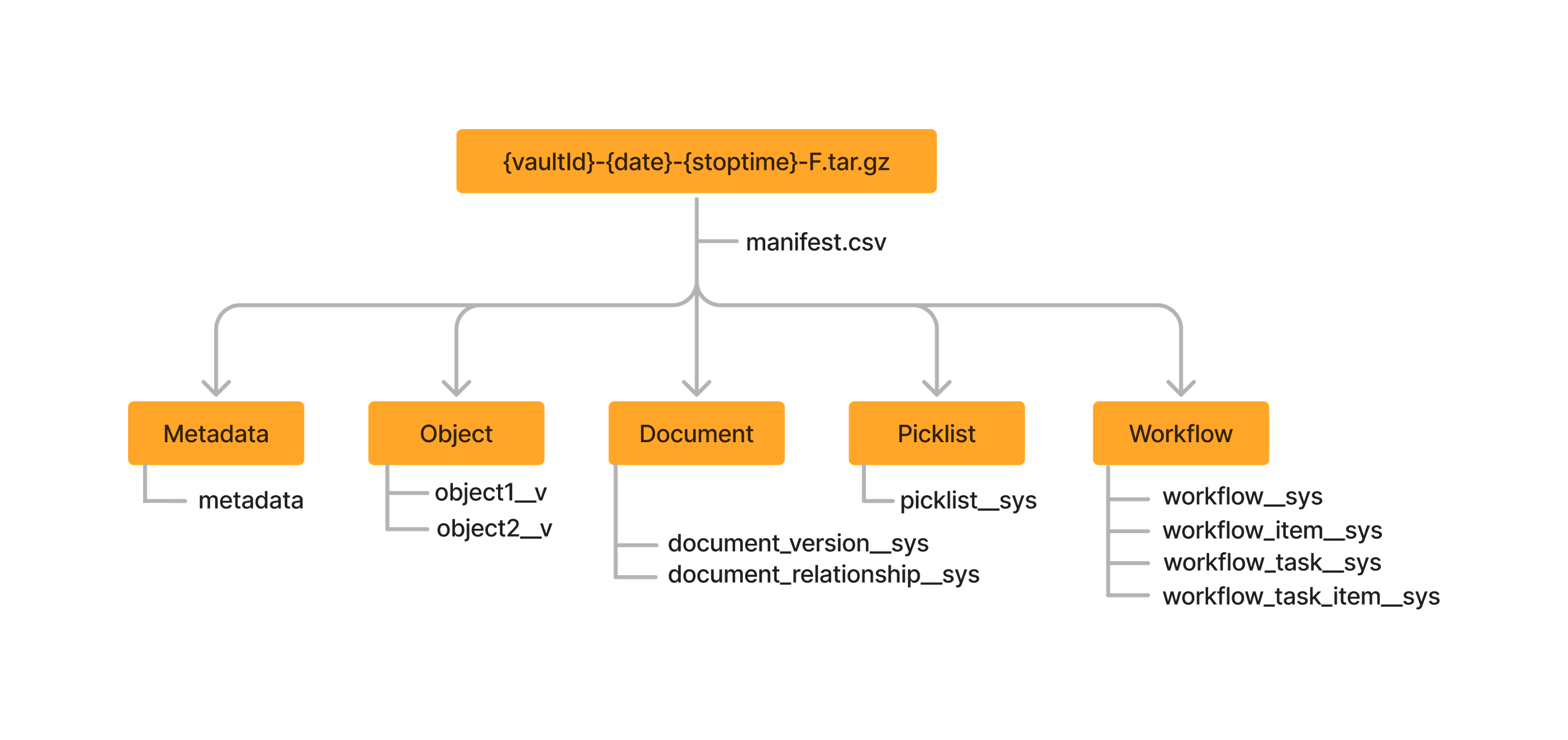
Each file is named according to the following format: {vaultid}-{date}-{stop_time}-{type}.tar.gz.{filepart}. The file name is comprised of the following variables:
vaultid: Refers to the Vault’s IDdate: Refers to the date that the file was created (in YYYYMMDD format)stop_time: Refers to the stop time in UTC of the interval (in HHMM format)type: Refers to the type of the file (N: Incremental, F: Full, L: Log)filepart: Refers to the part number of the file. Files greater than 1 GB in size are split into parts to keep downloads manageable (in NNN format). Learn more about working with file parts.
For example, 143462-20240123-0000-F.tar.gzip.001 indicates the first file part of a Full Direct Data file from a Vault with ID 143462 that contains data from the time the Vault was created to January 23, 2024, 00:00 UTC.
Publishing Files at Vault Time
Section link for Publishing Files at Vault TimeBy default, Direct Data API publishes Full and Log files at 01:00 Vault Time without adjusting for daylight saving time (DST). Since the schedule is based on the Vault's standard time and remains fixed in UTC year-round, the local delivery time will shift during DST. Furthermore, the stop_time indicated in file names and all timestamps within the files always remain in UTC.
For example, if your Vault is configured for the Pacific Time zone:
- During Standard Time (PST): Direct Data API extracts data up to 08:00 UTC (12:00 AM PST) and publishes the file at 09:00 UTC (01:00 AM PST). The generated file name indicates the 08:00 UTC cutoff. For example,
45277-20261108-0800-F.tar.gz. - During Daylight Saving Time (PDT): Since the UTC schedule is fixed, Direct Data API continues to extract data up to 08:00 UTC and publish at 09:00 UTC. Locally, this means the file contains data up to 01:00 AM PDT and is published at 02:00 AM PDT. The generated file name remains consistent with the UTC cutoff. For example,
45277-20260408-0800-F.tar.gz.
When an Admin changes the Vault's time zone, the scheduled extraction time updates accordingly. To ensure no gap between extracts, Direct Data API generates an additional Full and Log file at the previous time zone's scheduled time, followed by a new Full and Log file at the new time zone's schedule. Because of this transition, there will be up to three Full files available for a short period of time. Depending on the time of day the change is made, there may also be a one-time delay of up to 24 hours to produce the next scheduled file. Learn more about the Vault time zone